
How Can We Help?
How to check Remote Signature Requests
This article will show you how you can check if a Remote Signature Request has been completed and how to see the signature on the return.
To see if the taxpayer has or has not signed the Remote Signature Request.
- After you send the Remote Signature Request to the Taxpayer and/or Spouse, go to Remote Signature under the Attached Forms.
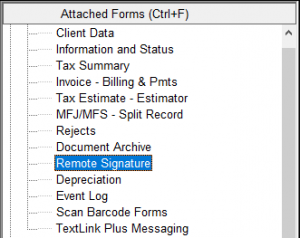
- If the Taxpayer and/or Spouse has not signed you will see the status Waiting: Taxpayer.

- If the Taxpayer and/or Spouse has signed you will see the status Completed/Archived.

To see the signature on the return, once the taxpayer signs the Remote Signature Request.
- From the Remote Signature Listing screen, click on the Completed/Archived status to select it.
- Click OPEN.

- Select the Document that is labeled Signed Full Tax Return.

- Click OPEN.

- The return will open in pdf form and you can scroll through and see the taxpayer signature.
